
Dive planner
ATIS Diving Club
1Opening and installing the app
The planner is a web app: it opens in the browser, with no download from the App Store or Play Store.

Scan the QR code with your phone camera, or type this in the browser's address bar (not in the Google search box):
planner.atis-shop.it
The presentation page opens: tap Open the planner. The app itself is at planner.atis-shop.it/app. The EN / IT button at the top switches language.
Putting the icon on your phone
iPhone / iPad (Safari)
- Open the site in Safari.
- Tap the Share button (square with an up arrow).
- Choose Add to Home Screen → Add.
Android (Chrome)
- Open the site in Chrome.
- Tap the ⋮ menu at the top right.
- Choose Install app (or Add to Home screen).
2The screen

| Button | What it does |
|---|---|
| Example profiles | Loads a ready-made profile (square, multilevel, wreck, deco with stage) to start from. Multilevel and deco with stage are Pro. |
| Save plan Pro | Downloads the plan as a .json file to keep or send to a buddy. |
| Open plan Pro | Reopens a saved file. |
| New | Clears the profile so you can draw a new one. Cylinder, SAC and GF stay as they are. |
| Guide | Opens this manual. |
| 🇬🇧 / 🇮🇹 | Next to the title: switches between English and Italian. The choice is remembered. |
| ⋯ More | Phone only: groups Save plan, Open plan, Dive slate and Print, to leave more room for the chart. |
| Dive slate Pro | Prints the cards to take into the water (see chapter 8). |
| Print / PDF | Prints the whole page, with chart and tables, on A4. For a PDF choose "Save as PDF" in the print window. |
| 🔒 Unlock Pro | Opens the window where you enter the Pro code (see chapter 11). With the code active it becomes ★ Pro. |
Below the bar the page has two parts: on the left the inputs (cylinders, consumption, decompression); on the right the results (verdict, chart, tables). On a phone the two parts are one below the other.
3Cylinders, consumption and GF
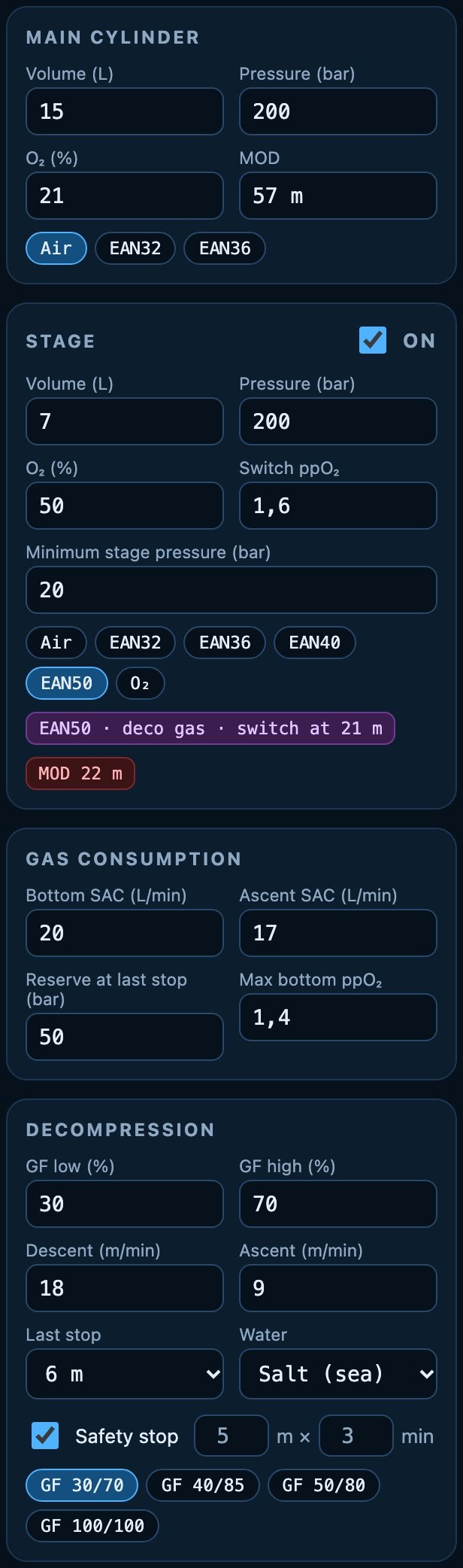
Main cylinder
- Volume in litres (e.g. 15) and fill pressure (e.g. 200 bar).
- O₂ %: 21 for air, 32 or 36 for nitrox. The Air / EAN32 / EAN36 buttons set it in one tap.
- MOD is worked out automatically: it is the maximum depth for that mix.
Stage Pro
- Tick on if you carry a second cylinder.
- If it has more oxygen than the main cylinder (e.g. EAN50) it is a deco stage: the app uses it on the ascent from the switch depth, shown in the purple label (e.g. "switch at 21 m").
- If it has the same mix or less oxygen it is a reserve stage: it is breathed first, down to the minimum stage pressure.
- Switch ppO₂: normally 1.6 (some divers use 1.4). It decides the depth of the gas switch.
- Minimum stage pressure: the pressure below which the stage is no longer used (normally 20 bar). It is separate from the reserve of the main cylinder: a stage can be breathed almost empty.
Gas consumption
- Bottom SAC and ascent SAC: your surface consumption in litres per minute. It is usually lower on the ascent. If you don't know it, 20 L/min is a cautious value.
- Reserve at last stop: the bar you still want when you reach the last stop (the 50 bar rule).
- Max bottom ppO₂: normally 1.4. It is used to work out the MOD.
Decompression
- GF low / GF high: how cautious you want to be. The 30/70, 40/85, 50/80 and 100/100 buttons set them straight away; the lower the numbers, the more conservative the plan.
- Descent and ascent rates in metres per minute (normally 18 and 9).
- Last stop: 6 m or 3 m.
- Water: salt (sea) or fresh (lake). It slightly changes the pressure calculation.
- Safety stop: leave it on. Normally 5 m × 3 min; the two boxes let you change depth (3 to 6 m) and duration.
4Drawing the profile
The profile is made of points. Each point means: "I reach this depth at this minute". The app draws a line between one point and the next. After the last point it works out the ascent, stops and safety stop by itself.
| What you want to do | Mouse | Finger (phone/tablet) |
|---|---|---|
| Quick plan | type depth and bottom time in the Quick plan box: stops and chart update at once (more levels with Pro). Leave the time empty (AUTO) and the planner finds the longest time that reaches the last stop with the reserve; adjust it with the ▲▼ arrows | |
| Add a point | click on the chart | tap on the chart |
| Move a point | drag the circle | drag the circle |
| Read values | hover over the chart | slide your finger sideways on the chart |
| Scroll the page | mouse wheel | drag on the edges of the chart (on the numbers at the sides or at the bottom, where you see ⇅) or touch outside the chart; inside it your finger works on the points |
| Delete a point | double-click | long press, or double tap |
| Exact values | type depth and minute in the Profile points table | |
Quick plan: type the numbers, see the stops
It is the fastest way, especially on a phone. The Quick plan box sits above the chart:
- Type the depth and the bottom time (the minute you leave the bottom, descent included). Right below you get the stops, runtime, TTS and the expected bar at the last stop; the chart draws itself.
- AUTO time: leave the time empty. The planner finds the longest time that reaches the last stop with at least the reserve you set (e.g. 50 bar), stops included. AUTO appears under the box.
- ▲▼ arrows: add or remove one minute. On an AUTO time they make it manual starting from the calculated value; to go back to automatic, clear the number.
- + Level Pro: up to 4 levels (e.g. 45 m, then 20 m). For the levels after the first, type the duration at that level, or leave it on AUTO: AUTO levels share the available time.
- If you move a point on the chart, the Quick plan numbers update.
Examples
- Square profile 30 m for 20': two points,
30 m at minute 2(end of descent) and30 m at minute 20(end of bottom time). - Multilevel Pro: add points at shallower depths, e.g. 30 → 18 → 15 → 12 m. Two points at the same depth make a level. In the free version the profile can have up to 3 points.
5Reading the chart
 1
2
3
4
5
6
7
8
9
10
11
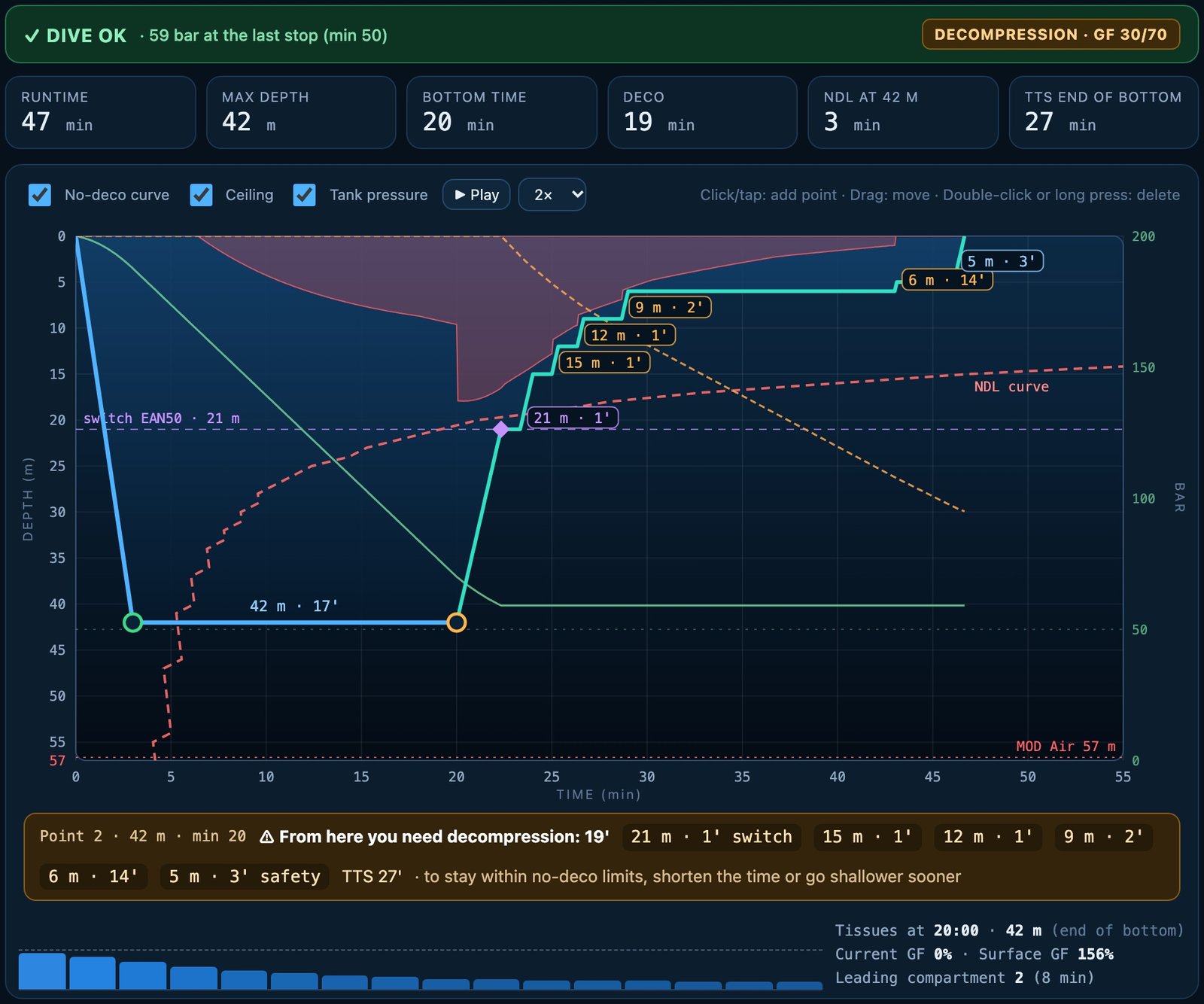
- 1Verdict: OK (green) or no-go (red), with the bar left at the last stop. On the right, NO-DECO or DECOMPRESSION and the GF in use.
- 2Boxes: total runtime, maximum depth, bottom time, deco minutes, NDL at maximum depth, TTS at the end of the bottom time.
- 3Your points (circles): drag them to change the profile. The blue line is the part you drew.
- 4Calculated ascent (aqua line) with the stops labelled, e.g.
6 m · 14'. - 5Ceiling (pink area): the depth you must not go above at that moment. If the profile line enters the pink area, you are ascending too early.
- 6NDL curve (red dashes): for each depth, the maximum time without deco. If the bottom time ends to the right of the curve, decompression is needed.
- 7Cylinder pressure (bar scale on the right): green for the main cylinder, dashed orange for the stage.
- 8Gas switch line (purple): from here up you breathe the deco stage.
- 9MOD of the main mix: do not go below this line.
- 10"If you ascend from here" strip: what you would need if you ascended from the selected point.
- 11Tissues: the 16 bars show how loaded with nitrogen each compartment is. Move your finger or the mouse over the chart to see the values minute by minute.
The boxes above the chart (No-deco curve, Ceiling, Tank pressure) turn these lines on and off.
▶ Play plays the dive: the cursor runs along the profile and stops by itself at the key points (end of bottom time, gas switch, stops), showing the values at that moment. Press Continue to go on; the box next to it sets the speed (1× = one minute of dive per second, up to 10×). ■ or a tap on the chart closes playback.
6The verdict and the warnings
✓ DIVE OK: the plan respects all the limits you set. ✕ NO-GO DIVE: at least one limit is exceeded. The reason is written under Summary and warnings.
| Cause of "no-go" | What to do |
|---|---|
| Gas below reserve | Less than the reserve is left at the last stop. Shorten the bottom time, use a bigger cylinder or add a stage. |
| Beyond the MOD | You are deeper than the mix allows. Go shallower or use a mix with less O₂. |
| Above the ceiling | The drawn profile ascends before the deco is done. Move the points deeper or later in time. |
| CNS ≥ 100 % | Too much oxygen breathed. Reduce time or ppO₂. |
| Stage not enough | The deco stage runs out before the surface. More litres or more bar. |
Yellow warnings don't make the dive no-go, but read them: mandatory deco, gas at the limit, ascent rate, narcosis below 30 m on air, GF that are not very conservative.
7Tables, gas and summary
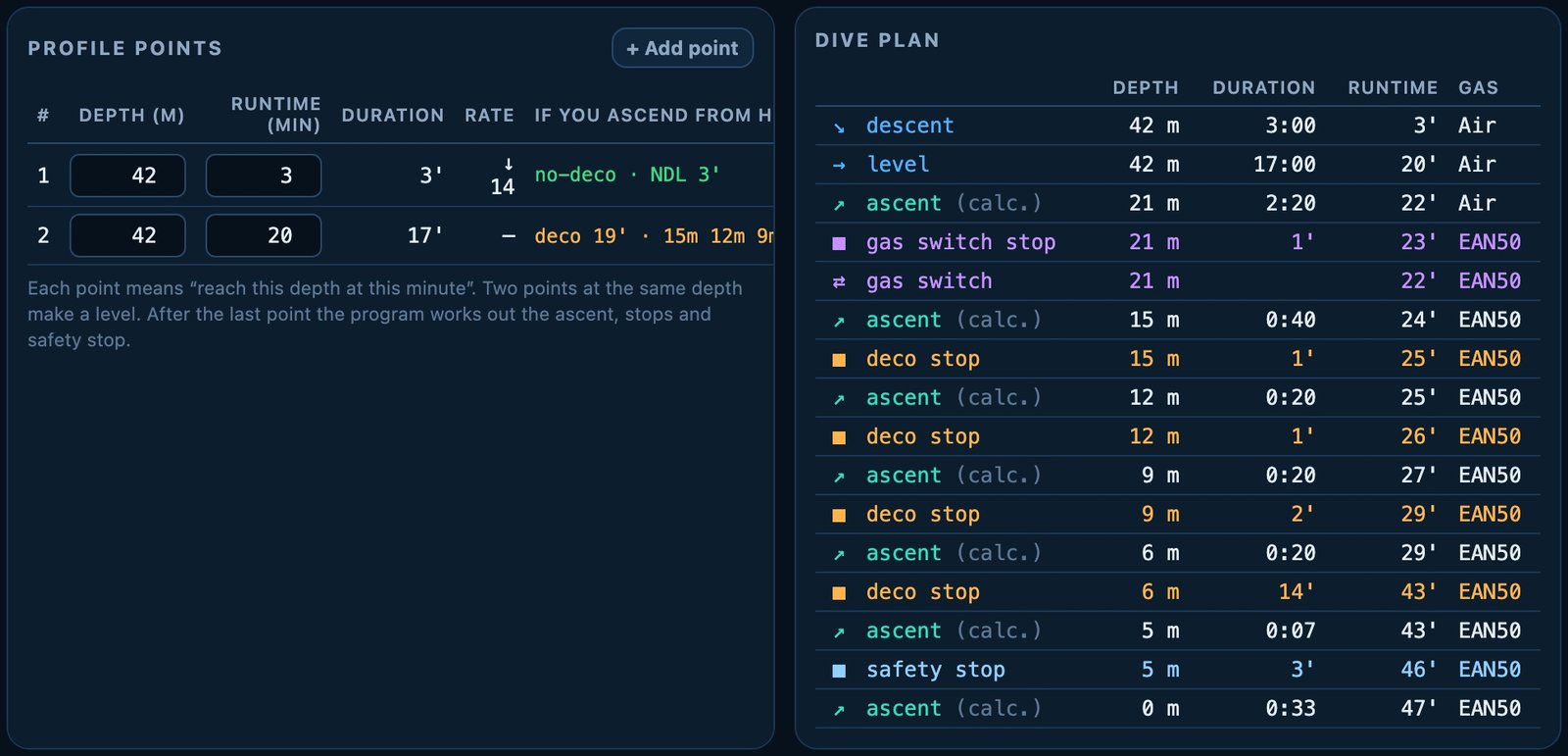
- Profile points: each point with depth, runtime, duration of the leg, rate and the "If you ascend from here" column (no-deco with NDL, or deco).
- Dive plan: the whole dive line by line. Descent, levels, ascents (calc.), deco stops, gas switch and safety stop, with duration, runtime and gas breathed.
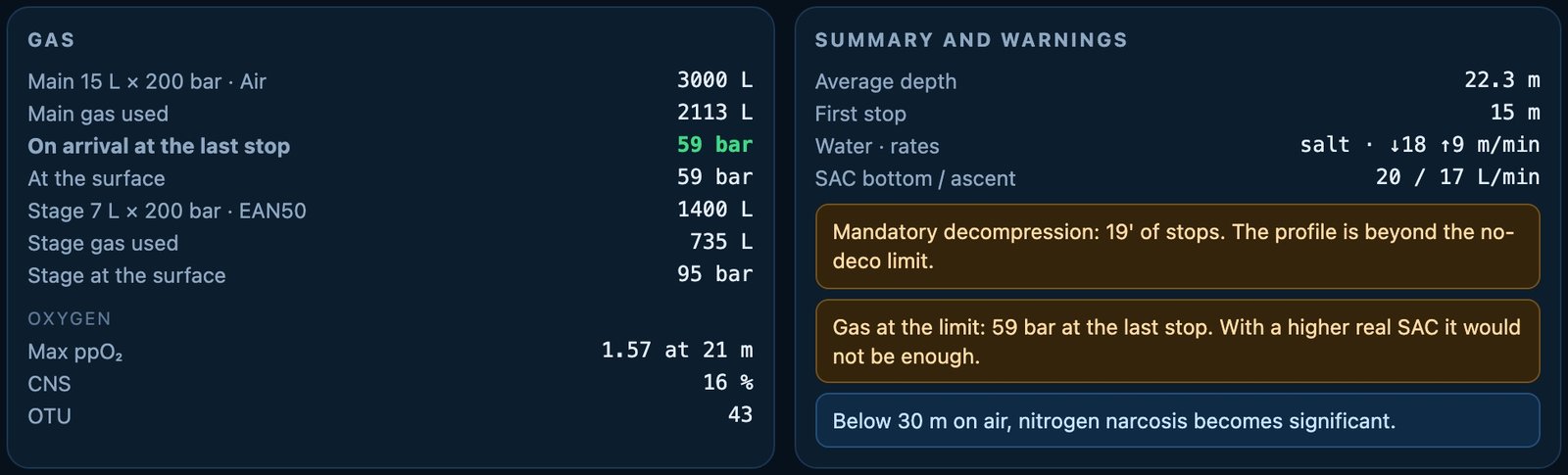
- Gas: litres available, litres used, bar on arrival at the last stop (the key figure, green if above the reserve), bar at the surface, the same for the stage, then max ppO₂, CNS and OTU.
- Summary: average depth, first stop, water type and rates, SAC used and the list of warnings.
8The dive slate to take into the water Pro
The Dive slate button prints, in black and white and in large type, the cards to copy onto your slate or to laminate. Each card takes half an A4 sheet.
| Card | When to use it |
|---|---|
| Plan | The dive as you planned it. |
| Contingency +3/+3 | If you overrun: 3 m deeper and 3 minutes longer on the bottom. The ascent is already recalculated. |
| Lost stage | Only with a deco stage: the whole ascent on the main cylinder, if you lose the stage or cannot use it. |
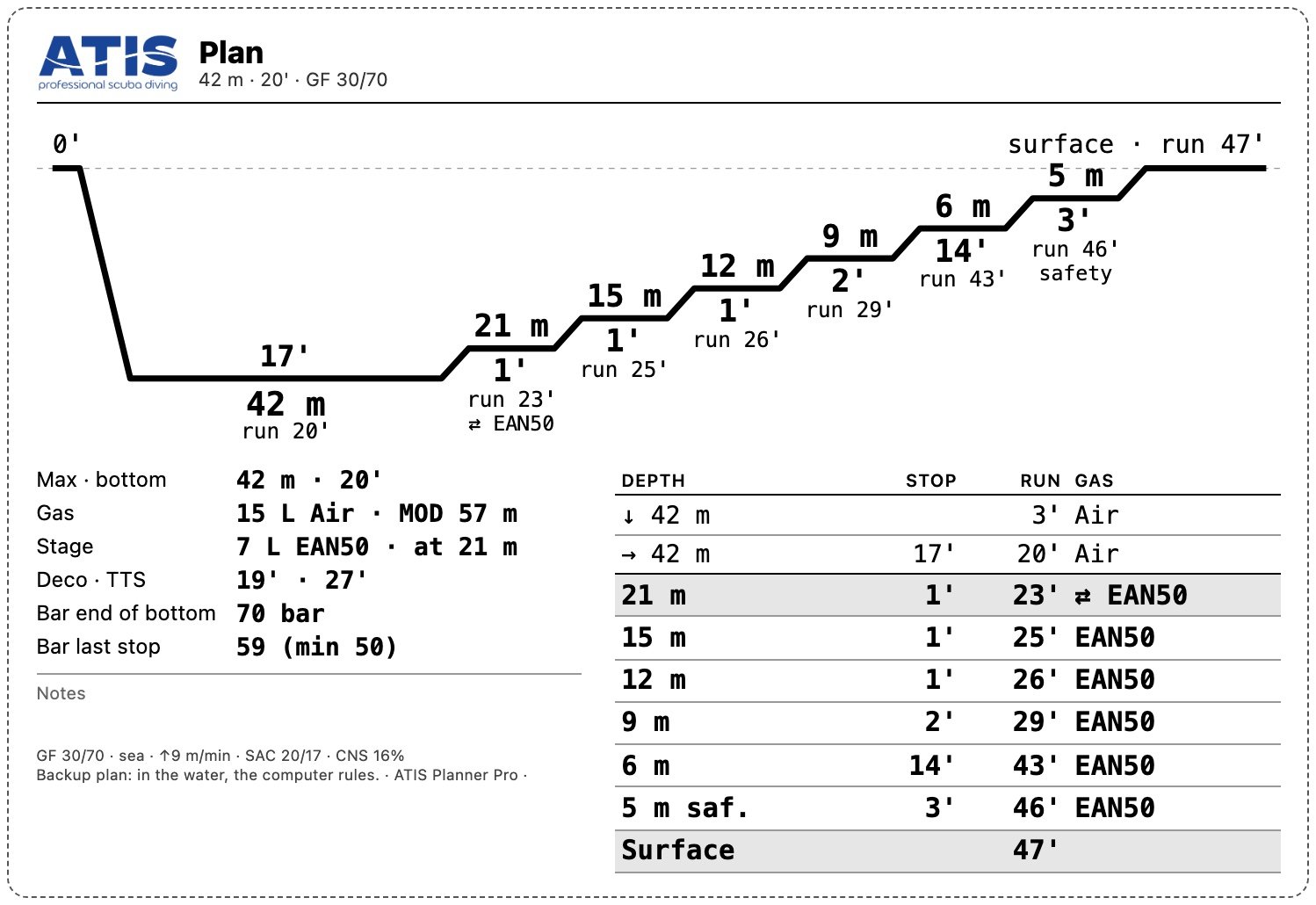
How to read it
- The drawing shows the profile as you would sketch it on a slate: the bottom at the bottom (
42 m,17',run 20'), then a step for each stop with depth, minutes and run. It is not to scale: every stop gets the same space so it is easy to read. - run = runtime, i.e. the minute on the timer when that stop ends. Example:
6 m · 14' · run 43'means: stay at 6 m until the timer shows 43. - ⇄ EAN50 shows where to switch gas. The line is highlighted in grey.
- Bar end of bottom: how many bar you should have when you start the ascent. If you have less, you are breathing more than expected.
- Bar last stop: the expected bar at the last stop and the minimum reserve.
- ⚠ box: it appears if that variant is not safe, for example "Last stop with 23 bar: below reserve". It means the plan has no margin for that contingency: better to change it before the dive.
See the cards for the deco example →
9Saving, opening, printing
- Every time you open the app the profile starts empty; cylinder, consumption and GF stay as you set them. To pick up a plan again use Open plan.
- Save plan creates a file to archive or send by WhatsApp or email. Whoever receives it opens it with Open plan.
- Print / PDF: the whole page on A4, useful for the briefing or your logbook. For a PDF choose "Save as PDF" in the print window.
- Dive slate: the cards for the water. On iPhone you can also save them as a PDF from the print window (spread the preview with two fingers, then Share).
10Step-by-step example
Goal: 30 m for 20 minutes, 15 L cylinder at 200 bar on air, GF 30/70.
- Press New. Set the cylinder to
15 L,200 bar, Air, SAC20 / 17, GF 30/70. - Tap the chart at 30 m at minute 2 (end of descent) and then at 30 m at minute 20 (end of bottom time). If needed, correct the numbers in the points table.
- Read the verdict: OK, but with decompression (stops at 12 m and 6 m) and 67 bar at the last stop.
- Press Dive slate: the +3/+3 card shows ⚠ "10 bar: below reserve". The plan has no margin.
- Try to improve it, each time checking the bar at the last stop on the +3/+3 card:
- bottom time 17' instead of 20': 46 bar, still below 50;
- EAN32 instead of air: only 3' of deco, but +3/+3 at 48 bar, still at the limit;
- a 7 L EAN50 stage: +3/+3 at 66 bar ✓, the plan has a margin.
- When no ⚠ appears, print and copy the slate. Set up your wrist computer anyway: in the water, it rules.
Steps 4 and 5 use the dive slate and the stage, which are part of the Pro version.
11Free and Pro versions
The free version shows you how dive planning works, with fixed example values: 15 L air cylinder, SAC 26 L/min, GF 30/70. The Pro version lets you plan your own dive with your own values, adds the features for more complex dives and supports the ATIS club.
| Free | Pro 5 € |
|---|---|
| Profile with up to 3 points, example values | Your own values (cylinder, nitrox, SAC, GF, water) and multilevel profiles with as many points as you like |
| Decompression, NDL and safety stop | Stage and deco gas: EAN50, O₂, reserve bottle |
| Gas consumption, reserve, MOD and CNS warnings | Dive slate with profile, +3/+3 and lost stage |
| Chart, tables and plan printing | Ready-made examples, save and open plans |
Free 24-hour trial
When you tap a 🔒 feature (stage, dive slate, save, Pro examples…) the planner offers a free 24-hour Pro trial: enter your email, receive a 6-digit code and type it in the app. During the trial the top button shows the time left (e.g. ★ Pro trial · 18 h). When it ends the locks come back and you go on with the free version, or you unlock Pro. The trial can be used once per email and per device. You will also find it in the 🔒 Unlock Pro window.
How to unlock it
- Buy the code from the
planner.atis-shop.itpage (Buy the Pro code button). If you have a gift code, enter it at checkout: the total becomes 0 €. The shop is in Italian: the code is in the order confirmation email. - You receive the code by email. It looks like this:
ATIS-XXXX-XXXX-XXXX. - In the planner press 🔒 Unlock Pro, enter the email used for the order and the code, tick the notice box and press Unlock Pro. Or tap the Attiva Pro nel planner button in the email: email and code are filled in for you.
planner.atis-shop.it to the sites allowed to save data. Entering email and code again on the same device does not use up a slot.★Glossary of terms
- RUNruntime
- Minutes since the start of the dive, i.e. since you left the surface. It is the number on the computer's timer. On the slate it is the minute when each stop ends.
- SACSurface Air Consumption
- Your personal air consumption at the surface, in litres per minute. At 10 m you use twice as much, at 20 m three times. It varies with cold, effort and stress.
- Bottom time
- Minutes from the start of the descent to the start of the ascent.
- Max depth
- The greatest depth reached.
- Average depth
- The average depth over the whole dive.
- NDLNo Decompression Limit
- Minutes you can still stay at that depth without needing deco stops.
- No-deco / deco
- No-deco: you can ascend straight to the surface, with just the safety stop. Deco: mandatory decompression stops are needed.
- NDL curve
- On the chart, the line joining the NDLs of all depths.
- Decodecompression
- The mandatory stops on the ascent to eliminate nitrogen. The "Deco" box shows the total minutes of stops.
- Deco stop
- A mandatory stop at a depth that is a multiple of 3 m (18, 15, 12, 9, 6, 3 m).
- Last stop
- The shallowest stop before the surface: 6 m or 3 m.
- Safety stop
- Normally 3 minutes at 5 m, recommended on every dive, even no-deco ones. On the slate: "saf." or "safety".
- Ceiling
- The shallowest depth you can be at, at that moment, without exceeding the limits. Do not go above the ceiling.
- TTSTime To Surface
- Minutes needed to get back to the surface from that moment, stops included.
- GFGradient Factor
- Two percentages (e.g. 30/70) that make the calculation more conservative. GF low sets the depth of the first stop (the lower it is, the deeper); GF high sets how long you stay at the shallow stops and the NDL curve (the lower it is, the longer the stops and the shorter the NDLs).
- Bühlmann ZH-L16C
- The mathematical decompression model used by the app and by many dive computers. It simulates 16 body "tissues".
- Tissuescompartments
- The 16 parts of the model, each absorbing nitrogen at a different speed. The bars below the chart show how loaded each one is.
- M-value
- The maximum nitrogen load a tissue can tolerate according to the model. GFs are a percentage of this limit.
- MODMaximum Operating Depth
- The maximum depth at which a mix can be breathed without exceeding the ppO₂ set. At ppO₂ 1.4: air 57 m, EAN32 about 34 m, EAN50 18 m.
- ppO₂partial pressure of oxygen
- How much the oxygen "weighs" in the mix at that depth. Usual limit 1.4 on the bottom, up to 1.6 during deco.
- Air / Nitrox / EAN
- Air = 21 % oxygen. Nitrox (EAN32, EAN36, EAN50…) = enriched air: the number is the oxygen percentage. More oxygen means less nitrogen, so longer NDLs but a shallower MOD.
- O₂
- Pure oxygen (100 %), used only for deco at 6 m or shallower.
- Stage
- A second cylinder carried at the side. Deco stage: a richer mix to speed up the ascent. Reserve stage: extra gas for the bottom.
- Gas switch ⇄
- The point of the ascent where you change from the main cylinder to the deco stage.
- Reserve50 bar rule
- The bar that must still be in the cylinder when you reach the last stop, as a safety margin.
- Bar end of bottom
- The expected bar in the main cylinder when you start the ascent. It is the reference to check on your gauge.
- Bar last stop
- The expected bar on arrival at the last stop, to compare with the reserve.
- CNS
- Percentage of nervous-system exposure to oxygen. Above 80 % it is at the limit, at 100 % the dive is no-go.
- OTU
- Oxygen toxicity units for the lungs. They matter on long or repeated dives.
- Narcosis
- The "drunken" effect of nitrogen at depth, significant below 30 m on air.
- Square profile
- Descent, all the time at the same depth, ascent.
- Multilevel
- A profile that comes up in steps (e.g. 30 → 18 → 12 m): it allows more total time than a square one.
- +3/+3 plan
- A contingency plan worked out for 3 m deeper and 3 minutes longer on the bottom.
- Lost stage
- A contingency plan with the whole ascent on the main cylinder.
- Verdict
- OK or no-go, based on gas, MOD, ceiling and oxygen.
- Ascent rate
- Metres per minute (normally 9 m/min). Slower is safer.
- Salt / fresh water
- Fresh water is lighter: the same depth gives a slightly lower pressure (10.2 m per bar instead of 9.9).